
Initiate Payments
This guide explains how institute admin can initiate fee payments through bulk Excel uploads, including automated processing, validations, email notifications, and scheduled automation.
Step-by-Step Workflow
Step 1: Download & Fill Excel Template
- Navigate to Fees Portal → Initiate Payment.
- Click on the Add button.
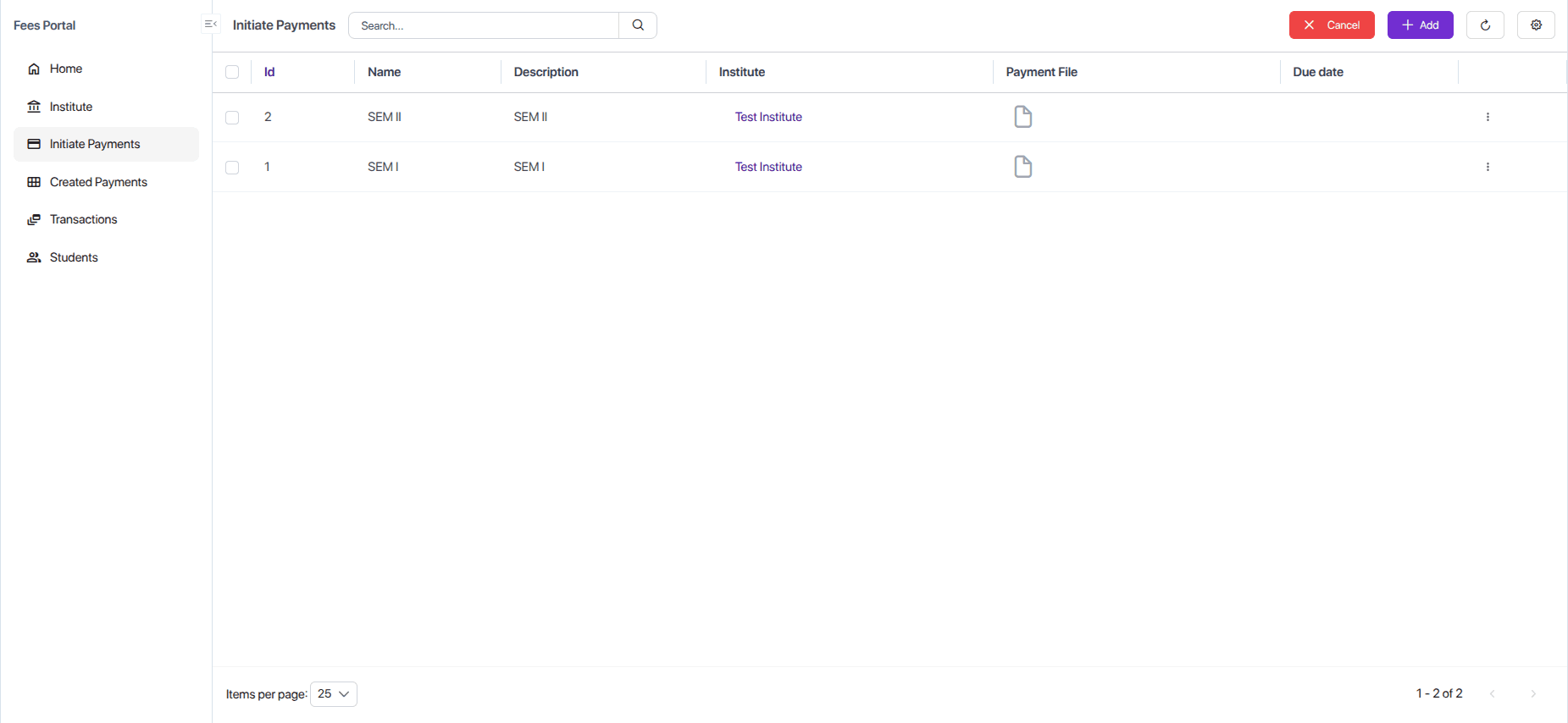
- A Download Template button will appear at the top-right corner of the form.
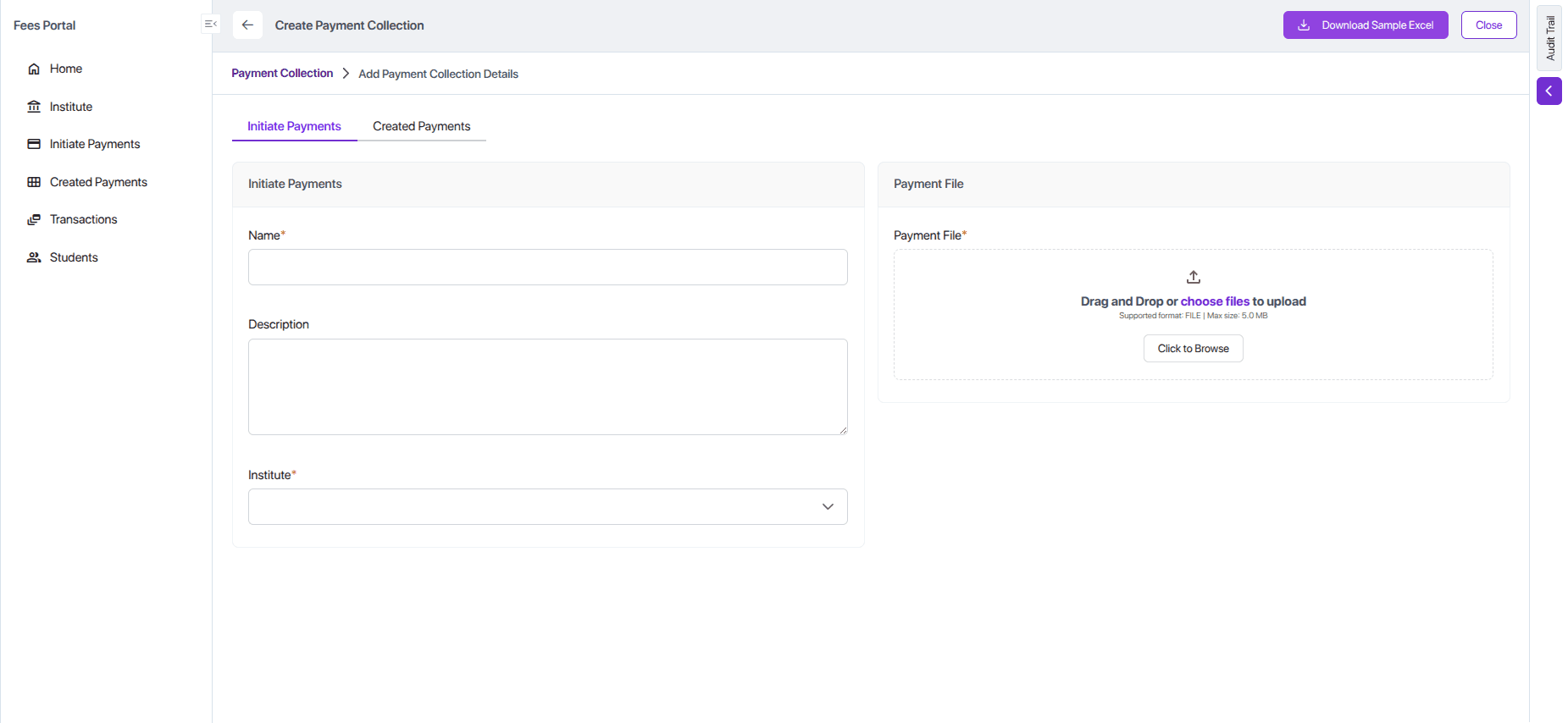
- Click it to download the Sample Excel Template.
Ensure the format and column structure remain unchanged so the system can validate and import the file successfully.
Open the file and fill in all required details like sample below:

Step 2: Upload Excel and Initiate Payment
Upload the completed Excel file and click "Save".
API Endpoint
The controller's create method handles the upload, triggers validation, and then starts the creation process.
@ApiTags('Fees Portal')
@Controller('payment-collection')
export class PaymentCollectionController {
  // ... constructor ...
  @Post()
  @UseInterceptors(AnyFilesInterceptor())
  async create(
    @Body() createDto: CreatePaymentCollectionDto,
    @UploadedFiles() files: Array<Express.Multer.File>,
  ) {
    await this.service.feeTypeValidation(createDto, files);
    return this.service.create(createDto, files);
  }
}
Step 3: Automated Validation (feeTypeValidation)
Before processing, the system validates the Excel file's contents, checking for correct fee types, valid due dates, correct payment modes, and proper email formats.
async feeTypeValidation(
  createDto: CreatePaymentCollectionDto,
  files: Express.Multer.File[],
) {
  if (!files?.length) throw new BadRequestException('Excel file is required');
  const { instituteId } = createDto;
  if (!instituteId) throw new BadRequestException('Institute ID is required');

  const file = files[0];
  const workbook = new ExcelJS.Workbook();
  await workbook.xlsx.readFile(file.path);
  const worksheet = workbook.worksheets[0];
  const headerRow = worksheet.getRow(1);
  const headers: string[] = (headerRow.values as ExcelJS.CellValue[])
    .slice(1).filter((cell): cell is string => typeof cell === 'string').map(cell => cell.trim());

  const knownFields = ['Student Name', 'Student Id', 'Parent / Guardian Name', 'Parent / Guardian Email', 'Parent / Guardian Mobile', 'Payment Mode'];
  const possibleFeeTypes = headers.filter(header => {
    const normalized = header.toLowerCase();
    return !knownFields.some(f => f.toLowerCase() === normalized) && !normalized.includes('due date');
  }).map(header => header.trim());
  const uniqueFeeTypes = Array.from(new Set(possibleFeeTypes)).filter(Boolean);
  if (!uniqueFeeTypes.length) throw new BadRequestException('No fee types found in Excel headers.');

  const existingFeeTypes = await this.feeTypeRepo.createQueryBuilder('fee_type')
    .leftJoin('fee_type.institute', 'institute')
    .where('fee_type.feeType IN (:...names)', { names: uniqueFeeTypes })
    .andWhere('institute.id = :instituteId', { instituteId })
    .getMany();
  const existingNames = existingFeeTypes.map(f => f.feeType);
  const missingFeeTypes = uniqueFeeTypes.filter(name => !existingNames.includes(name));
  if (missingFeeTypes.length) throw new BadRequestException(`These fee types are not configured: ${missingFeeTypes.join(', ')}`);

  const today = new Date();
  today.setHours(0, 0, 0, 0);
  for (let i = 2; i <= worksheet.rowCount; i++) {
    const row = worksheet.getRow(i);
    if (!row.hasValues) continue;
    for (const feeType of uniqueFeeTypes) {
      const dueDateHeader = `${feeType} Due Date`;
      const dueDateIndex = headers.findIndex(h => h === dueDateHeader);
      if (dueDateIndex === -1) continue;
      const dueDateCell = row.getCell(dueDateIndex + 1);
      let dueDateValue: Date | null = null;
      if (typeof dueDateCell.value === 'string' && dueDateCell.value.trim()) {
        const [year, month, day] = dueDateCell.value.trim().split('-').map(Number);
        dueDateValue = new Date(year, month - 1, day);
      } else if (dueDateCell.type === ExcelJS.ValueType.Date && dueDateCell.value instanceof Date) {
        dueDateValue = dueDateCell.value;
      }
      if (dueDateValue && dueDateValue < today) throw new BadRequestException(`Past due dates are not allowed for student "${row.getCell(headers.indexOf('Student Name') + 1).value}" and fee type "${feeType}".`);
    }
  }

  const paymentModeIndex = headers.findIndex(h => h.toLowerCase() === 'payment mode');
  if (paymentModeIndex !== -1) {
    for (let i = 2; i <= worksheet.rowCount; i++) {
      const row = worksheet.getRow(i);
      if (!row.hasValues) continue;
      const cell = row.getCell(paymentModeIndex + 1);
      let value = (cell.value || '').toString().trim().toUpperCase();
      if (!value) {
        value = 'PG';
        cell.value = 'PG';
      }
      if (value !== 'CASH' && value !== 'PG') throw new BadRequestException(`Invalid Payment Mode "${cell.value}". Only "CASH" or "PG" are allowed.`);
    }
  } else {
    throw new BadRequestException('Payment Mode column is missing.');
  }

  const getEmailValue = (cell: ExcelJS.Cell): string => {
    if (!cell.value) return '';
    if (typeof cell.value === 'string') return cell.value.trim();
    if (typeof cell.value === 'object' && 'text' in cell.value) return (cell.value as any).text.trim();
    return String(cell.value).trim();
  };
  const parentEmailIndex = headers.findIndex(h => h.toLowerCase() === 'parent / guardian email');
  for (let i = 2; i <= worksheet.rowCount; i++) {
    const row = worksheet.getRow(i);
    if (!row.hasValues) continue;
    const parentEmail = getEmailValue(row.getCell(parentEmailIndex + 1));
    if (parentEmail !== parentEmail.toLowerCase()) throw new BadRequestException(`Emails must be in lowercase for student "${row.getCell(headers.indexOf('Student Name') + 1).value}".`);
  }
}
Step 4: Background Processing with MediaTransactionSubscriber
After upload, a MediaTransactionSubscriber processes the file asynchronously.
afterInsert Method
This method triggers when a new Media record is saved. If it's a paymentFile, it calls paymentCollectionTransaction to begin processing.
To register Media-related subscribers, create a new file named media-transaction.subscriber.ts inside the directory:
solid-api/src/module-name/subscriber/. This subscriber will listen for Media lifecycle events and trigger the appropriate background processing logic.
import { Injectable } from '@nestjs/common';
import { InjectDataSource, InjectRepository } from '@nestjs/typeorm';
import { Media } from '@solidstarters/solid-core/';
import * as ExcelJS from 'exceljs';
import * as path from 'path';
import {
  DataSource,
  EntityManager,
  EntitySubscriberInterface,
  EventSubscriber,
  InsertEvent,
  UpdateEvent,
} from 'typeorm';
import { PaymentCollection } from '../entities/payment-collection.entity';
import { PaymentCollectionItem } from '../entities/payment-collection-item.entity';
import { Student } from '../entities/student.entity';
import { FeeType } from '../entities/fee-type.entity';
import { PaymentService } from '../services/payment.service';
@EventSubscriber()
@Injectable()
export class MediaTransactionSubscriber implements EntitySubscriberInterface<Media> {

  constructor(
    @InjectDataSource()
    private readonly dataSource: DataSource,
    @InjectRepository(Student)
    private readonly paymentService: PaymentService
  ) {
    this.dataSource.subscribers.push(this);
  }

  listenTo() {
    return Media;
  }

  async afterInsert(event: InsertEvent<Media>): Promise<void> {
    if (!event?.entity) {
      return;
    }
    const media = event.entity;
    const transactionManager = event.queryRunner?.manager;

    if (media.modelMetadata.singularName === 'paymentCollection' && media.fieldMetadata.name === 'paymentFile') {
      const isCompletedSuccessFully = await this.paymentCollectionTransaction(
        event,
        transactionManager,
      );
    }
  }
}
paymentCollectionTransaction Method
This method orchestrates the processing of the Excel file.
Chunk 1: Load Data and File
First, it loads the PaymentCollection and its related feeTypes. It then locates the uploaded Excel file on the server.
private async paymentCollectionTransaction(event: InsertEvent<Media>, transactionManager: EntityManager) {
  const media = event.entity;
  const paymentCollectionRepo = transactionManager.getRepository(PaymentCollection);
  const paymentCollection = await paymentCollectionRepo.findOne({
    where: { id: media.entityId },
    relations: ['institute', 'institute.feeTypes'],
  });

  if (!paymentCollection.institute?.feeTypes?.length) {
    throw new Error(`No fee types configured for institute: ${paymentCollection.institute.name}`);
  }

  const folderPath = path.resolve(process.cwd(), 'media-files-storage/');
  const filePath = path.join(folderPath, media.relativeUri);
Chunk 2: Read Excel and Process Rows
Next, it uses ExcelJS to open the workbook, read the headers, and then loop through each row, calling processRow to handle the data for each student.
  const workbook = new ExcelJS.Workbook();
  await workbook.xlsx.readFile(filePath);
  const sheet = workbook.worksheets[0];
  if (!sheet) return;

  const headers: Record<string, number> = {};
  sheet.getRow(1).eachCell((cell, colNumber) => {
    headers[cell.value as string] = colNumber;
  });

  for (let i = 2; i <= sheet.rowCount; i++) {
    const row = sheet.getRow(i);
    if (row.hasValues) {
      await this.processRow(row, paymentCollection, transactionManager, headers, event);
    }
  }
}
private async paymentCollectionTransaction(event: InsertEvent<Media>, transactionManager: EntityManager) {
const media = event.entity;
const paymentCollectionRepo = transactionManager.getRepository(PaymentCollection);
const paymentCollection = await paymentCollectionRepo.findOne({
where: { id: media.entityId },
relations: ['institute', 'institute.feeTypes'],
});
// Validation to check if the institute has feeTypes configured.
const feeTypes = paymentCollection.institute?.feeTypes;
if (!feeTypes || feeTypes.length === 0) {
throw new Error(`No fee types configured for institute: ${paymentCollection.institute || 'unable-to-resolve-institute'}`)
}
const folderPath = path.resolve(process.cwd(), 'media-files-storage/');
const filePath = path.join(folderPath, media.relativeUri);
const workbook = new ExcelJS.Workbook();
await workbook.xlsx.readFile(filePath);
const sheet = workbook.worksheets[0];
if (!sheet) {
console.error('Excel sheet not found!');
return;
}
const headers: Record<string, number> = {};
const headerRow = sheet.getRow(1);
headerRow.eachCell((cell, colNumber) => {
headers[cell.value as string] = colNumber;
});
for (let i = 2; i <= sheet.rowCount; i++) {
const row = sheet.getRow(i);
if (!row.hasValues) {
continue;
}
const result = await this.processRow(row, paymentCollection, transactionManager, headers, event);
}
}processRow Method
This is the core logic that handles each student's data from the Excel file.
Chunk 1: Data Extraction and Student Find-or-Create
The code extracts all student-related data from the row. It then attempts to find an existing student with the same studentId for the institute. If the student doesn't exist, a new one is created.
private async processRow(...) {
  const studentRepo = transactionManager.getRepository(Student);
  // ... other repos

  // Helper function to get cell values
  const getCellValue = (headerName: string) => { /* ... */ };

  const studentName = getCellValue('Student Name');
  // ... extract other student details

  let student = await studentRepo.findOne({
    where: { studentId, institute: { id: paymentCollection?.institute?.id }},
  });

  if (!student) {
    student = studentRepo.create({ /* ... new student data ... */ });
  } else {
    // Update existing student's info if needed
    student.studentName = studentName;
    // ...
  }
  await studentRepo.save(student);
Chunk 2: Payment Item Creation
It then iterates over the institute's configured feeTypes. For each fee type that has an amount specified in the row, it creates a PaymentCollectionItem. The status is set to Fully Paid for CASH payments and Pending for PG payments.
  for (const feeType of paymentCollection.institute.feeTypes) {
    const amount = parseFloat(getCellValue(`${feeType.feeType}`) || '0');
    if (amount > 0) {
      let status = 'Pending';
      let amountPaid = 0;
      if (mode === 'CASH') {
        status = 'Fully Paid';
        amountPaid = amount;
      }
      const item = paymentCollectionItemRepo.create({
        student,
        paymentCollection,
        institute: paymentCollection.institute,
        feeType,
        amountToBePaid: amount,
        status,
        amountPaid,
        mode,
        // ... other fields
      });
      await paymentCollectionItemRepo.save(item);
    }
  }
Chunk 3: Send Grouped Email Notifications
After processing all fees for the student in the row, the code fetches all newly created items. It groups them by status and sends a single, consolidated email: one for all Fully Paid (cash) items and another for all Pending (PG) items.
  const allItems = await paymentCollectionItemRepo.find({ where: { /* ... */ }});

  const fullyPaidItems = allItems.filter(i => i.status === 'Fully Paid');
  const pendingItems = allItems.filter(i => i.status === 'Pending');

  // Send "Payment Success" email for cash payments
  if (fullyPaidItems.length > 0) {
    await this.paymentService.sendPaymentSuccessMail(...);
  }

  // Send "Fee Due" email for online payments
  if (pendingItems.length > 0) {
    await this.paymentService.sendDueFeesMail(...);
  }
}
step 5: Sending Mail asynchronously
Import MailFactory from Solid Core
import { MailFactory } from '@solidstarters/solid-core';

@Injectable()
export class PaymentService extends CRUDService<Payment> {
  //init nest logger
  private readonly logger = new Logger(PaymentService.name);
  constructor(
        private readonly mailServiceFactory: MailFactory
  )
}

const mailService = this.mailServiceFactory.getMailService();
Create sendPaymentSuccessMail in payment.service.ts
 async sendPaymentSuccessMail(instituteId: number,payment:any,itemDetails:any,transactionStatus:string) {
    const institute = await this.instituteService.findOne(instituteId || 0, {
      populateMedia: ['logo']
    });

    // TODO: Trigger an email to the parent saying that payment confirmation received.
    const mailService = this.mailServiceFactory.getMailService();
    await mailService.sendEmailUsingTemplate(
      payment.student.parentEmailAddress,
      'confirm-payment',
      {
        paymentDetails: {
          paymentCollection:payment.paymentCollections,
          txnId: payment.mSwipeIpgTransId,
          totalAmountDue: payment.amount,
          createdAt: payment.createdAt,
          feeTypes: itemDetails ? itemDetails.map(
            (d) => d.paymentCollectionItem.feeType?.feeType || 'N/A',
          ) : payment.feeTypes,
          totalAmount: payment.amount,
          status: transactionStatus === 'success' ? 'Paid' : 'Failed'
        },
        student: {
          studentName: payment.student.studentName,
          studentLoginId: payment.student.studentLoginId,
          institute: {
            instituteName: payment.institute.instituteName,
            supportEmail:payment.institute.supportEmail,
            supportMobile:payment.institute.supportMobile
          },
        },
        instituteLogo: payment?.institute?._media?.logo?.[0]?._full_url ?? institute?._media?.logo?.[0]?._full_url  ?? null
      },
      true,
      [],
      [],
      null,
      null
    );
    this.logger.debug(`Confirmation sent to ${payment.student.parentEmailAddress}`);
}
Same for sendDueFeesMail
  async sendDueFeesMail(dueFees: any, instituteId: number) {
    // 1. Get unpaid items
    //fetch institue by name then take id and call another
    const institute = await this.instituteService.findOne(instituteId || 0, {
      populateMedia: ['logo']
    });
    // 5. Send mail
      const mailService = this.mailServiceFactory.getMailService();
      await mailService.sendEmailUsingTemplate(
        dueFees.parentEmailAddress,
        'new-payment-or-payment-reminder',
        {
          dueDetails: dueFees,
          instituteLogo:institute._media.logo[0]._full_url,
          student: dueFees.student,
        },
        true,
        [],
        [],
        null,
        null,
      );
}
Below is the complete source code for Process row
private async processRow(row: ExcelJS.Row, paymentCollection: PaymentCollection, transactionManager: any, headers: Record<string, number>, event: InsertEvent<Media>) {

    const studentRepo = transactionManager.getRepository(Student);
    const feeTypeRepo = transactionManager.getRepository(FeeType);
    const paymentCollectionItemRepo = transactionManager.getRepository(
      PaymentCollectionItem,
    );

    const parseDateToObject = (dateString: string): Date | null => {
      if (!dateString) return null; // Handle empty values
      const [day, month, year] = dateString.split('-').map(Number);
      return new Date(year, month - 1, day);
    };

    // adding new date test
    const formatDateToDDMMYYYY = (date: Date): string => {
      const day = String(date.getDate()).padStart(2, '0');
      const month = String(date.getMonth() + 1).padStart(2, '0');
      const year = date.getFullYear();
      return `${year}-${month}-${day}`;
    };

    const getCellValue = (headerName: string) => {
      if (headers[headerName] === undefined) return null;
      const cell = row.getCell(headers[headerName]);

      if (!cell || cell.value === null) return null;

      // Handle native Excel Date type
      if (cell.type === ExcelJS.ValueType.Date && cell.value instanceof Date) {
        return formatDateToDDMMYYYY(cell.value); // Convert to dd-mm-yyyy string
      }

      // Fallback to text
      return cell.text?.trim?.() ?? null;
    };

    // end
    const studentName = getCellValue('Student Name');
    const studentId = getCellValue('Student Id');
    const studentMobileNo = getCellValue('Student Mobile');
    const parentName = getCellValue('Parent / Guardian Name');
    const parentEmail = getCellValue('Parent / Guardian Email');
    const parentMobile = getCellValue('Parent / Guardian Mobile');
    const mode = getCellValue('Payment Mode').toUpperCase() || 'PG';

    let student = await studentRepo.findOne({
      where: { studentId, institute: { id: paymentCollection?.institute?.id }},
      relations: ['institute'],
    });
    if (!student) {
      student = studentRepo.create({
        studentName: studentName,
        parentName: parentName,
        parentMobileNumber: parentMobile,
        parentEmailAddress: parentEmail,
        studentId: studentId,
        institute: paymentCollection?.institute,
        studentMobileNumber: studentMobileNo,
      });
    }
    student.studentName = studentName;
    student.parentName = parentName;
    student.parentEmailAddress = parentEmail;
    student.parentMobileNumber = parentMobile;
    // student.studentId = studentId;
    student.studentMobileNumber = studentMobileNo;
    student.instituteId = paymentCollection?.institute;

    const studentResult = await studentRepo.save(student);

    for (const feeType of paymentCollection.institute.feeTypes) {
      const amount = parseFloat(getCellValue(`${feeType.feeType}`) || '0');
      const dueDateStr = getCellValue(`${feeType.feeType} Due Date`);
      const dueDate = dueDateStr ? new Date(dueDateStr) : new Date(paymentCollection?.dueDate);
      // const partAllowedStr = getCellValue(`${feeType.feeType} Part Payment Allowed`);
      // const partPaymentAllowed = partAllowedStr?.toLowerCase() === 'yes' || partAllowedStr === 'Yes';
      const partPaymentAllowed = feeType?.partPaymentAllowed;

      if (amount > 0) {
        let status = 'Pending';
        let amountPaid = 0;
        let amountPending = amount;

        // If mode is CASH, mark as fully paid
        if (mode === 'CASH') {
          status = 'Fully Paid';
          amountPaid = amount;
          amountPending = 0;
        }

        const item = paymentCollectionItemRepo.create({
          student,
          paymentCollection,
          institute: paymentCollection.institute,
          feeType,
          dueDate: dueDate || new Date(),
          amountToBePaid: amount,
          partPaymentAllowed,
          status,
          amountPaid,
          amountPending,
          isOverdue: false,
          overdueByDays: 0,
          totalAmountToBePaid: amount,
          lateAmountToBePaid: 0,
          mode: mode,
        });

        await paymentCollectionItemRepo.save(item);
      }

    }

    // After saving items for this student...
    // Fetch items for this student (both paid + pending)
  const allItems = await paymentCollectionItemRepo.find({
      where: {
        student: { studentLoginId: student.studentLoginId },
        paymentCollection: { id: paymentCollection.id },
      },
      relations: ['feeType', 'paymentCollection', 'student', 'institute'],
    });

    const fullyPaidItems = allItems.filter(i => i.status === 'Fully Paid');
    const pendingItems = allItems.filter(i => i.status === 'Pending');

    if (fullyPaidItems.length > 0) {
      // ✅ CASE 1: Student has only fully paid items → send one Success mail
      const feeTypes = [...new Set(fullyPaidItems.map(i => i.feeType?.feeType))].join(', ');
      const paymentCollections = [...new Set(fullyPaidItems.map(i => i.paymentCollection?.name))].join(', ');

      const createdAt = new Date().toLocaleDateString('en-US', {
        day: '2-digit',
        month: 'short',
        year: 'numeric',
      }).toUpperCase();

      await this.paymentService.sendPaymentSuccessMail(
        paymentCollection.institute.id,
        {
          student,
          amount: fullyPaidItems.reduce((sum, i) => sum + Number(i.amountPaid || 0), 0),
          feeTypes,
          paymentCollections,
          createdAt,
          institute: student.institute,
        },
        null,
        'success',
      );

    } else if (pendingItems.length > 0) {
      console.log('Pending items exist',pendingItems);
      // ✅ CASE 2: Student still has dues → send one Due mail
      const totalAmountDue = pendingItems.reduce((sum, i) => {
        const totalAmountToBePaid = Number(i.totalAmountToBePaid) || 0;
        const amountPaid = Number(i.amountPaid) || 0;
        return sum + (totalAmountToBePaid - amountPaid);
      }, 0);
      console.log(totalAmountDue);
      const feeTypes = [...new Set(pendingItems.map(i => i.feeType?.feeType))].join(', ');
      const paymentCollections = [...new Set(pendingItems.map(i => i.paymentCollection?.name))].join(', ');

      const createdAt = new Date().toLocaleDateString('en-US', {
        day: '2-digit',
        month: 'short',
        year: 'numeric',
      }).toUpperCase();

      const dueFees = {
        totalAmountDue,
        feeTypes,
        status: 'Pending',
        redirectUrl: `https://${pendingItems?.[0].institute.hostedPagePrefix}-${process.env.EDU_BASE_DOMAIN}/?id=${student.studentLoginId}`,
        createdAt,
        paymentCollections,
        parentEmailAddress: student.parentEmailAddress,
        student,
      };

      await this.paymentService.sendDueFeesMail(dueFees, paymentCollection.institute.id);
    }
  }
Step 6: Automating Post-Payment Processes with Scheduled Jobs
System uses scheduled background jobs to automate tasks such as calculating late fees and sending reminder emails to parents. After creating the job classes, each one must be registered in Solid UI.
1. Late Fee Calculator Job
The LateFeePaymentCalculatorScheduledJob runs automatically (e.g., every minute, hourly, daily, weekly, monthly) to apply late fees to overdue payments.
execute Method
This is the entry point for the scheduled job.
Chunk 1: Find Overdue Items
The job first queries the database for all PaymentCollectionItem records that are past their dueDate and are not already Cancelled or Fully Paid.
@Injectable()
@ScheduledJobProvider()
export class LateFeePaymentCalculatorScheduledJob implements IScheduledJob {
  async execute(reminder: ScheduledJob): Promise<void> {
    const today = new Date();
    today.setHours(0, 0, 0, 0);

    const items = await this.entityManager.find(PaymentCollectionItem, {
      where: {
        dueDate: LessThan(today),
        status: Not(In(['Cancelled', 'Fully Paid'])),
      },
      relations: ['feeType', 'institute'],
    });
Chunk 2: Calculate Late Fees
It then iterates through the overdue items. For each item, it calculates the late fee based on the policy defined in the associated FeeType (Percent or Absolute).
    for (const item of items) {
      if (!item.feeType?.latePaymentFeesType || item.feeType.latePaymentFeesType === 'None') continue;

      const overdueByDays = /* ... calculate days ... */;
      const basePending = Number(item.amountToBePaid) - Number(item.amountPaid);
      let lateAmountToBePaid = 0;

      if (item.feeType.latePaymentFeesType === 'Percent') {
        lateAmountToBePaid = (basePending * Number(item.feeType.latePaymentFees)) / 100;
      } else if (item.feeType.latePaymentFeesType === 'Absolute') {
        lateAmountToBePaid = Number(item.feeType.latePaymentFees);
      }
Chunk 3: Update Payment Items
Finally, it updates the PaymentCollectionItem with the new lateAmountToBePaid, overdueByDays, and the recalculated totalAmountToBePaid and amountPending.
      const totalAmountToBePaid = Number(item.amountToBePaid) + lateAmountToBePaid;
      const amountPending = totalAmountToBePaid - Number(item.amountPaid);

      await this.entityManager.update(
        PaymentCollectionItem,
        { id: item.id },
        {
          lateAmountToBePaid,
          overdueByDays,
          amountPending: String(amountPending),
          totalAmountToBePaid: String(totalAmountToBePaid),
        },
      );
    }
  }
}
import { Injectable, Logger } from '@nestjs/common';
import { IScheduledJob, ScheduledJob, ScheduledJobProvider } from '@solidstarters/solid-core';
import { InjectEntityManager } from '@nestjs/typeorm';
import { EntityManager, In, LessThan, Not } from 'typeorm';
import { PaymentCollectionItem } from '../entities/payment-collection-item.entity';
@Injectable()
@ScheduledJobProvider()
export class LateFeePaymentCalculatorScheduledJob implements IScheduledJob {
private readonly logger = new Logger(LateFeePaymentCalculatorScheduledJob.name);
constructor(
@InjectEntityManager()
private readonly entityManager: EntityManager,
) {}
async execute(reminder: ScheduledJob): Promise<void> {
this.logger.debug(`Hello from job: ${reminder.job}`);
this.logger.debug(`Reminder Name: ${reminder.scheduleName}, ID: ${reminder.id}`);
const today = new Date();
today.setHours(0, 0, 0, 0); // normalize to midnight
// Step 1: Fetch overdue PaymentCollectionItems
const items = await this.entityManager.find(PaymentCollectionItem, {
where: {
dueDate: LessThan(today),
status: Not(In(['Cancelled', 'Fully Paid'])),
},
relations: ['feeType', 'institute'],
});
this.logger.debug(`Found ${items.length} overdue payment collection items.`);
const filteredItems = items.filter(
item =>
item.feeType &&
item.feeType.latePaymentFeesType &&
item.feeType.latePaymentFeesType !== 'None',
);
for (const item of filteredItems) {
const dueDate = new Date(item.dueDate);
dueDate.setHours(0, 0, 0, 0);
const now = new Date();
now.setHours(0, 0, 0, 0);
// Overdue days
const overdueByDays = Math.floor(
(now.getTime() - dueDate.getTime()) / (1000 * 60 * 60 * 24),
);
// Calculate base pending
const amountToBePaid = Number(item.amountToBePaid || 0);
const amountPaid = Number(item.amountPaid || 0);
const basePending = amountToBePaid - amountPaid;
// Late fee calculation
let lateAmountToBePaid = 0;
if (item.feeType.latePaymentFeesType === 'Percent') {
lateAmountToBePaid =
(basePending * Number(item.feeType.latePaymentFees || 0)) / 100;
} else if (item.feeType.latePaymentFeesType === 'Absolute') {
lateAmountToBePaid = Number(item.feeType.latePaymentFees || 0);
}
// Round properly
lateAmountToBePaid = Math.round(lateAmountToBePaid * 100) / 100;
// Recalculate totals
const totalAmountToBePaid = amountToBePaid + lateAmountToBePaid;
const amountPending = totalAmountToBePaid - amountPaid;
// Debug logging
this.logger.debug(
`Item ${item.id} | Due: ${dueDate.toDateString()} | Overdue: ${overdueByDays} days | ` +
`BasePending=${basePending} | LateFee=${lateAmountToBePaid} | ` +
`Total=${totalAmountToBePaid} | Pending=${amountPending}`,
);
// Update the item
await this.entityManager.update(
PaymentCollectionItem,
{ id: item.id },
{
lateAmountToBePaid,
overdueByDays, // ✅ no +1 shift
amountPending: String(amountPending),
totalAmountToBePaid: String(totalAmountToBePaid),
},
);
this.logger.debug(
`Updated item ${item.id}: overdueByDays=${overdueByDays}, lateAmountToBePaid=${lateAmountToBePaid}`,
);
}
this.logger.debug(`Completed late fee calculation for ${filteredItems.length} items.`);
}
}2. Reminder Email Job
The SendEmailScheduleJobs class is a scheduled job designed to automatically send reminder emails for pending or partially paid fees. It groups all outstanding payments for each student and sends a single, consolidated email to their parent or guardian.
execute Method
This is the entry point for the scheduled job.
Chunk 1: Find Due Items
The job queries the database for all PaymentCollectionItem records with a status of Pending or Partially Paid. It also fetches related student and fee information.
@Injectable()
@ScheduledJobProvider()
export class SendEmailScheduleJobs implements IScheduledJob {
  async execute(reminder: ScheduledJob): Promise<void> {
    const dueItems = await this.entityManager.find(PaymentCollectionItem, {
      where: {
        status: In(['Pending', 'Partially Paid']),
      },
      relations: ['student', 'student.institute', 'feeType', 'paymentCollection'],
    });
Chunk 2: Group Items by Student
The job iterates through the due items and groups them into a Map, where each key is a studentLoginId and the value is an object containing the student's details and a list of their pending payment items. This ensures that each student receives only one reminder email, even if they have multiple outstanding fees.
    const studentMap = new Map<string, { student: Student; items: PaymentCollectionItem[] }>();

    for (const item of dueItems) {
      const studentLoginId = item.student.studentLoginId;
      if (!studentMap.has(studentLoginId)) {
        studentMap.set(studentLoginId, { student: item.student, items: [item] });
      } else {
        studentMap.get(studentLoginId)!.items.push(item);
      }
    }
Chunk 3: Send Consolidated Emails
Finally, the job iterates through the studentMap. For each student, it calculates the total amount due, compiles a list of the corresponding fee types, and constructs a redirect URL to the student's payment portal. It then uses the MailFactory to send a templated email (new-payment-or-payment-reminder) to the parent's email address with all the necessary details.
    for (const { student, items } of studentMap.values()) {
      if (!student.parentEmailAddress) continue;

      let totalAmountDue = 0;
      // ... calculate total amount and fee types ...

      const redirectUrl = `https://${institute?.hostedPagePrefix}-${process.env.EDU_BASE_DOMAIN}/?id=${student?.studentLoginId}`;

      const dueFees = {
        totalAmountDue,
        feeTypes,
        status: 'Pending',
        redirectUrl,
        // ... other details
      };

      const mailService = this.mailServiceFactory.getMailService();
      await mailService.sendEmailUsingTemplate(
        student.parentEmailAddress,
        'new-payment-or-payment-reminder',
        { /* ... template variables ... */ },
      );
    }
  }
}
import { Injectable, Logger } from '@nestjs/common';
import {
IScheduledJob,
MailFactory,
ScheduledJob,
ScheduledJobProvider,
} from '@solidstarters/solid-core';
import { InjectEntityManager } from '@nestjs/typeorm';
import { EntityManager, In } from 'typeorm';
import { PaymentCollectionItem } from '../entities/payment-collection-item.entity';
import { Student } from '../entities/student.entity';
import { InstituteService } from '../services/institute.service';
@Injectable()
@ScheduledJobProvider()
export class SendEmailScheduleJobs implements IScheduledJob {
private readonly logger = new Logger(SendEmailScheduleJobs.name);
constructor(
@InjectEntityManager()
private readonly entityManager: EntityManager,
private readonly mailServiceFactory: MailFactory,
private readonly instituteService:InstituteService
) { }
async execute(reminder: ScheduledJob): Promise<void> {
this.logger.debug(`Reminder Name: ${reminder.scheduleName}, ID: ${reminder.id}`,);
const dueItems = await this.entityManager.find(PaymentCollectionItem, {
where: {
status: In(['Pending', 'Partially Paid']),
},
relations: ['student', 'student.institute', 'feeType', 'paymentCollection'],
});
this.logger.debug(`due items are: ${dueItems}`);
// Map of studentLoginId vs an object representing more info about the student + pending payment collection items.
const studentMap = new Map<
string,
{
student: Student;
items: PaymentCollectionItem[];
}
>();
for (const item of dueItems) {
const studentLoginId = item.student.studentLoginId;
if (!studentMap.has(studentLoginId)) {
studentMap.set(studentLoginId, {
student: item.student,
items: [item],
});
} else {
studentMap.get(studentLoginId)!.items.push(item);
}
}
this.logger.debug(`studentMap items are: ${studentMap}`);
for (const { student, items } of studentMap.values()) {
if (!student.parentEmailAddress) {
this.logger.warn(`No parent email for student ${student.studentName}`);
continue;
}
let totalAmountDue = 0;
const feeTypesSet = new Set<string>();
const paymentCollectionSet = new Set<string>();
for (const item of items) {
const totalAmountToBePaid = Number(item.totalAmountToBePaid) || 0;
const amountPaid = Number(item.amountPaid) || 0;
const due = totalAmountToBePaid - amountPaid;
totalAmountDue += due;
feeTypesSet.add(item.feeType.feeType || 'Fee');
paymentCollectionSet.add(item.paymentCollection?.name);
}
const feeTypes = Array.from(feeTypesSet).join(', ');
const paymentCollections = Array.from(paymentCollectionSet).join(', ');
const status = 'Pending'
//`${process.env.STUDENT_PORTAL_FRONTEND_BASE_URL}/?id=${student.studentLoginId}`;
const createdAt = new Date().toLocaleDateString('en-US', {
day: '2-digit',
month: 'short',
year: 'numeric',
}).toUpperCase();
const institute = await this.instituteService.findWithLogo(
student.institute?.id || 0,
);
const redirectUrl = `https://${institute?.hostedPagePrefix}-${process.env.EDU_BASE_DOMAIN}/?id=${student?.studentLoginId}`;
const dueFees = {
totalAmountDue,
feeTypes,
status,
redirectUrl,
createdAt,
paymentCollections
}
// TODO: Need to replace all the manual HTML creation to rely on template based emails instead.
const mailService = this.mailServiceFactory.getMailService();
await mailService.sendEmailUsingTemplate(
student.parentEmailAddress,
'new-payment-or-payment-reminder',
{
dueDetails: dueFees,
student: student,
instituteLogo:institute._media.logo[0]._full_url ?? '',
supportEmail:institute.supportEmail,
supportMobile:institute.supportMobile
},
true,
[],
[],
null,
null
);
this.logger.debug(`Reminder sent to ${student.parentEmailAddress}`);
}
}
}step 7: Registering Scheduled Jobs
After creating the scheduled job classes, register them through Solid UI to enable automatic execution at defined intervals.
-
Navigate to Scheduled Jobs
Go to:Solid → Other → Scheduled Jobs → Create New -
Select the Job
In the Job Selector, choose the job you want to schedule (e.g.,LateFeePaymentCalculatorScheduledJoborSendEmailScheduleJobs). -
Configure Frequency
Select an execution interval based on your requirements (e.g., Daily, Hourly). -
Activate
Save the job to activate the scheduler.
Configuration Examples
Below are example configurations for both jobs.
Late Fee Calculation Job:
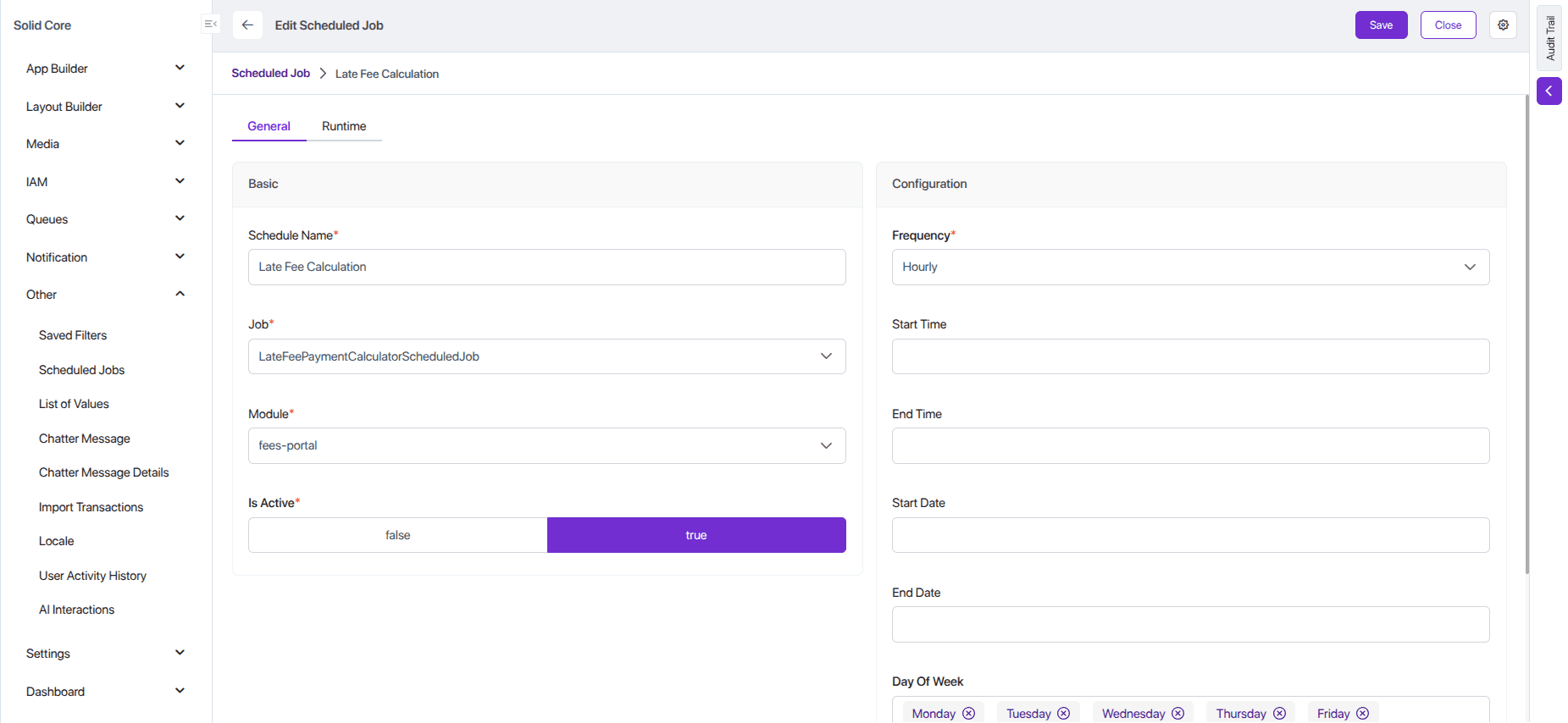
{
  "scheduleName": "Late Fee Calculation",
  "isActive": true,
  "frequency": "Hourly",
  "startTime": null,
  "endTime": null,
  "startDate": null,
  "endDate": null,
  "dayOfMonth": 0,
  "lastRunAt": "2025-09-05T07:09:00.009Z",
  "nextRunAt": "2025-09-05T07:10:00.009Z",
  "dayOfWeek": "[\"Monday\",\"Tuesday\",\"Wednesday\",\"Thursday\",\"Friday\",\"Saturday\",\"Sunday\"]",
  "job": "LateFeePaymentCalculatorScheduledJob",
  "moduleUserKey": "fees-portal"
}
Fees Due Reminder Email Job:
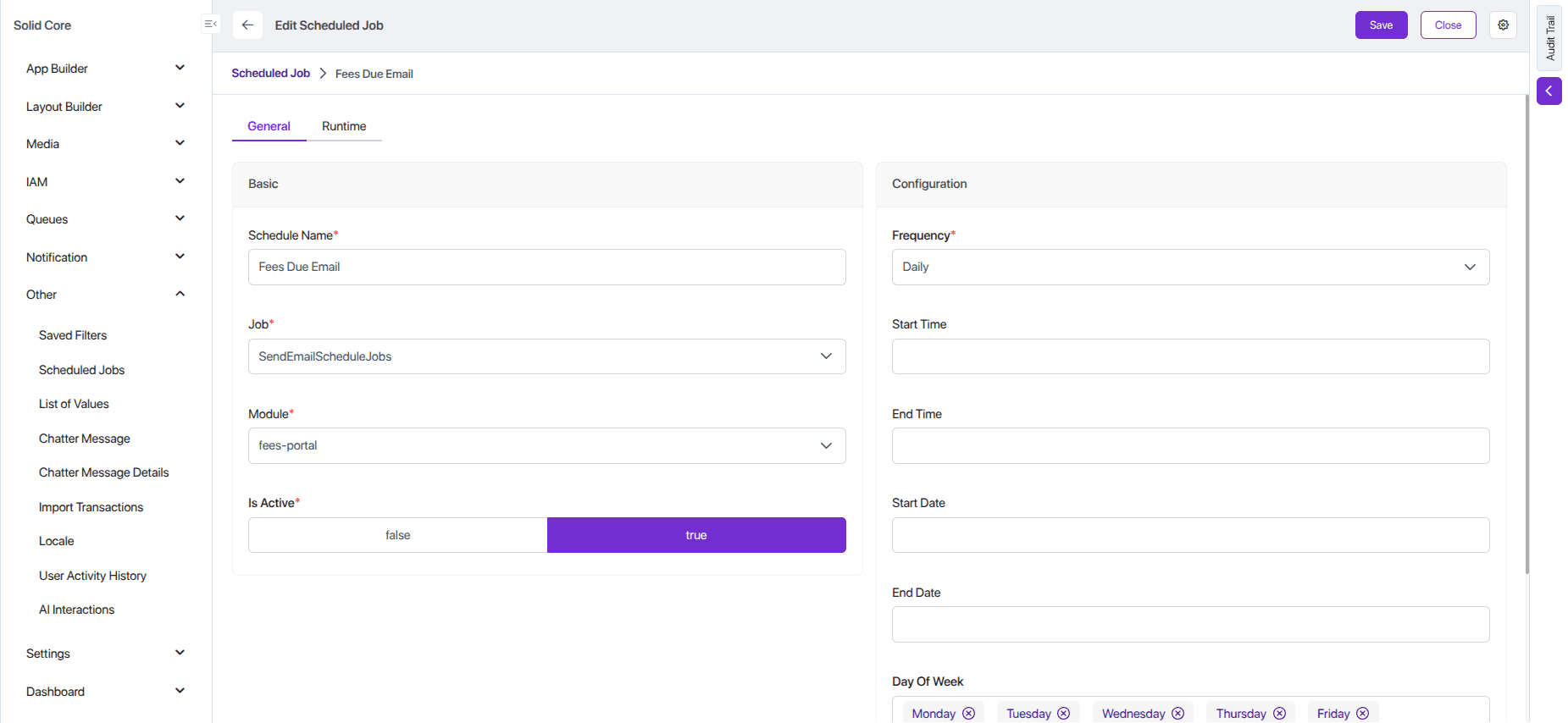
{
  "scheduleName": "Fees Due Email",
  "isActive": true,
  "frequency": "Daily",
  "startTime": null,
  "endTime": null,
  "startDate": null,
  "endDate": null,
  "dayOfMonth": 0,
  "lastRunAt": "2025-09-10T09:10:00.006Z",
  "nextRunAt": "2025-09-10T09:11:00.006Z",
  "dayOfWeek": "[\"Monday\",\"Tuesday\",\"Wednesday\",\"Thursday\",\"Friday\",\"Saturday\",\"Sunday\"]",
  "job": "SendEmailScheduleJobs",
  "moduleUserKey": "fees-portal"
}